 IndieBase

Table of Contents
Help & Support
Raise support tickets directly in IndieBase and track them through to resolution
Raise a support ticket directly from IndieBase and track your request through to resolution.
Help & Support
IndieBase includes a built-in helpdesk that lets you raise support tickets, attach files, and track progress — all without leaving the app.
The Helpdesk
The helpdesk is the fastest way to get help from the IndieBase team. Every ticket you raise is tracked, and you can follow progress, add comments, and upload attachments directly in the app.
To access the helpdesk, click Helpdesk in the sidebar navigation. If there are open tickets with unread updates, you'll see a count badge on the sidebar link.

Raising a New Ticket
- Click Helpdesk in the sidebar to open your ticket list.
- Click the New Issue button in the top-left of the helpdesk page.
- Give your ticket a clear Title (up to 64 characters).
- Select an Issue Type from the dropdown (Team Admins only) - see below for the available types.
- Write a description in the Body field. The more detail you include, the faster we can help — for bugs in particular, mention your device, operating system, and browser.
- Optionally attach files using the Upload files area. You can drag and drop images, click to browse, or paste an image directly from your clipboard. JPG, PNG, and GIF files up to 20 MB are accepted.
- Click Save to submit the ticket.
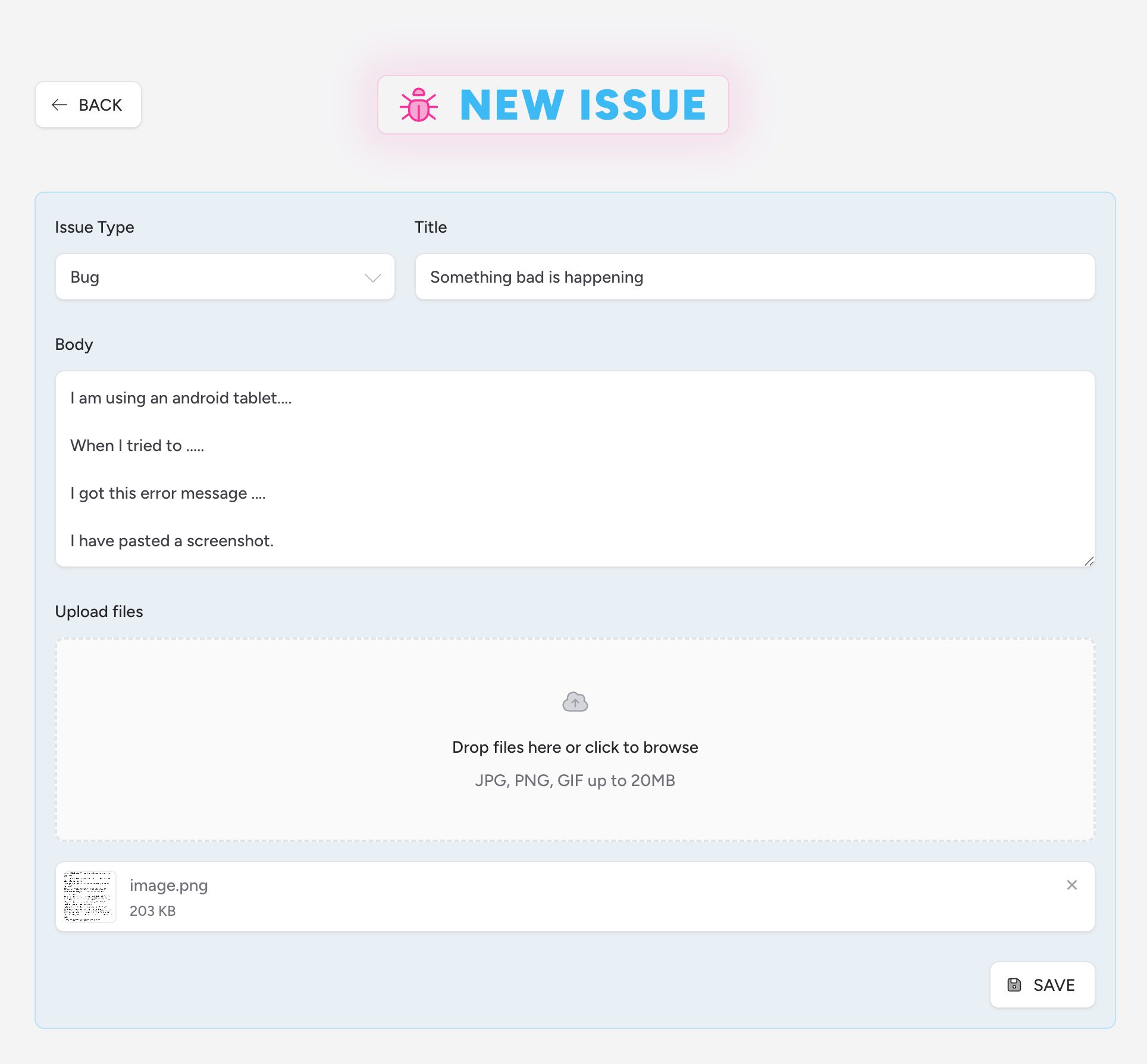
Once submitted, your ticket status is set to submitted and the IndieBase support team is notified automatically.
Issue Types
Choose the type that best describes your request:
| Type | When to use |
|---|---|
| Bug | Something isn't working as expected |
| Feature Request | You'd like to suggest an improvement or new capability |
| Data Request | You need help with data — exports, corrections, or access |
| Correction | Something in the app is displaying or recording incorrectly |
| Question | You're not sure how something works |
Tracking Your Tickets
All your submitted tickets appear on the Helpdesk page, ordered by most recently updated. Each ticket shows:
- The current status (see below)
- The ticket title
- A comment count, if the team has replied
- When it was created and last updated
Use the search field to find a specific ticket by title or description. Toggle Show Completed to include tickets that have been resolved or closed.
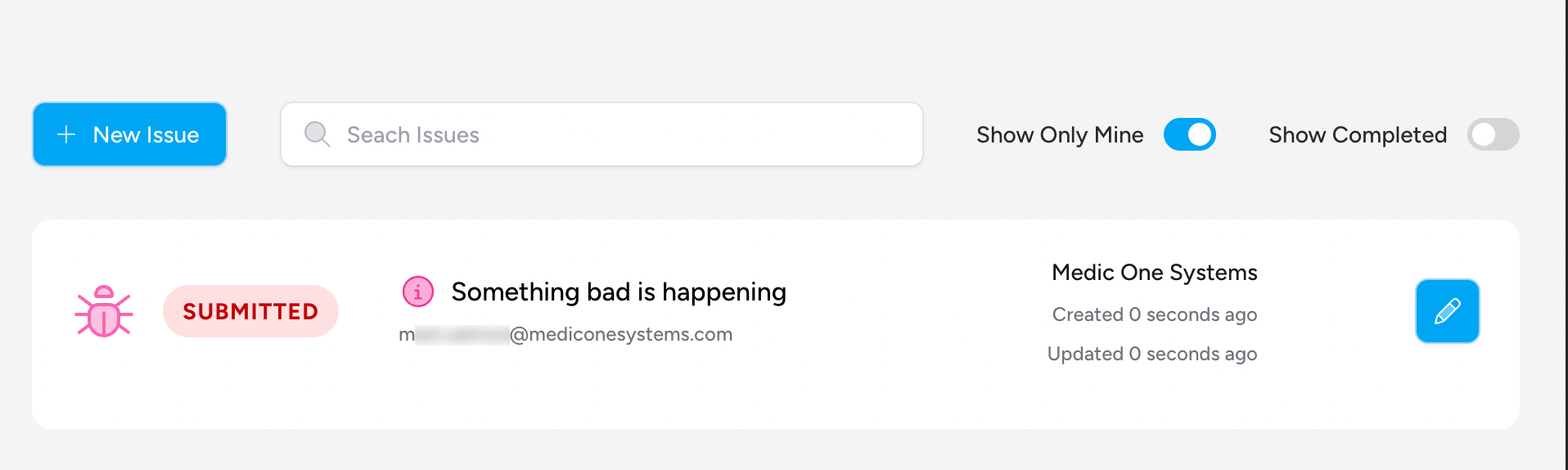
If your team has an Admin, they can see all tickets raised by anyone on the team. Non-admin users see only their own tickets.
Ticket Statuses
| Status | What it means |
|---|---|
| submitted | Ticket received, not yet picked up |
| discussion | The support team has a question or is discussing the issue |
| waiting | We're waiting on information from you |
| in progress | Actively being worked on |
| pending | Work done, awaiting confirmation or deployment |
| backlog | Noted for future consideration |
| completed | Resolved |
| closed | No further action required |
Viewing and Updating a Ticket
Click the edit (pencil) icon next to any ticket to open it. On the ticket detail page you can:
- Read the full description and any attached files
- Add a comment to provide more information or respond to a question from the support team
- Upload additional files as attachments
When you open a ticket that has unread updates, it's automatically marked as read — so the badge count in the sidebar stays accurate.
Email Support
If you're unable to access the app or prefer to contact us directly, email support@indiebase.net. We aim to respond within 24–48 hours during UK business hours.
For urgent issues — system outages, data loss, or anything affecting patient care — include "URGENT" in the subject line so we can prioritise your request.
For security concerns, email support@indiebase.net with "SECURITY CONCERN" in the subject. All reports are treated in strict confidence.
Before You Contact Support
It's always worth checking this documentation first. Use the search box at the top of the docs to find guides by keyword, or browse by category. The Troubleshooting section covers the most common technical issues.