 IndieBase

Table of Contents
Subscription
How IndieBase subscriptions work, what each plan unlocks, how to subscribe, and how to manage billing through the Stripe portal.
Subscription
Subscriptions are managed at the team level — the team owner controls billing, and every member of the team benefits from whatever plan the team is on.
Overview
Every team in IndieBase has a plan that determines which features are available to all its members. The team owner is the only person who can subscribe, change plans, or manage billing. Regular team members simply benefit from whatever plan the team is on, with no individual billing or payment required.
Subscriptions are processed securely through Stripe. Your payment details are never stored on IndieBase's own servers.
Before You Start
- Only the team owner can manage subscriptions and billing.
- You must be logged in to your IndieBase account to access billing.
- Subscription management is found in your Team Settings page, in the Subscription section.
Plans at a Glance
IndieBase offers a free tier and paid plans. Every paid plan unlocks the full feature set — plans differ in price and in allowances such as how many checklists and custom panels your team can create, not in which features you get.
| Feature | Free | Paid |
|---|---|---|
| Patient records (PRFs) | Yes | Yes |
| Unlimited patients | Yes | Yes |
| Unlimited devices | Yes | Yes |
| Multiple team members | No | Yes |
| Drugs, Interventions, Hospitals | Yes | Yes |
| Basic customisation (fields, injuries, interventions, drugs) | Yes | Yes |
| Basic clinical insights (dashboard, logbooks, datatables) | Yes | Yes |
| Advanced customisation (panels, checklists, templates) | No | Yes |
| Smart features (patient feedback, secure email PRFs, monitor integrations) | No | Yes |
| Event management / control room | No | Yes |
| Advanced insights (reports, KPIs, case reviews) | No | Yes |
| Media storage (photos, audio, video) | No | Yes |
| Branding, vehicles, venues | No | Yes |
If you're not sure whether IndieBase is right for you, the 31-day free trial gives you full access to explore before committing.
What an active subscription unlocks
Feature access is a single question: does your team have an active subscription? A team counts as active when it holds any paid subscription, is within a trial period, or is on custom billing. Active teams get every feature above; the plan you choose sets your price and your allowances (for example, the number of checklists and custom panels).
Storing Patient Identifiable Data additionally requires an ICO Registration Number and acceptance of the Terms of Use — see Information Governance.
A Beta subscription is shown for teams currently on a generic pre-launch trial. Beta grants full access to all features for the duration of the trial period.
The 31-Day Free Trial
New teams that have never had a subscription are eligible for a 31-day free trial when they first subscribe to any paid plan. During the trial you get full access to the plan you've signed up for.
Payment details are captured upfront at the point of subscribing, but no charge is made until the trial period ends. You can cancel at any time during the trial without being charged.
If your team is already on a Beta subscription (the pre-launch generic trial), subscribing to a paid plan before the Beta trial expires carries the remaining trial time across — you won't lose it.
Once the trial ends, billing begins on your chosen cycle. Teams that have previously held any subscription (including a cancelled one) are not eligible for the trial period on a new subscription.
Subscribing to a Plan
- Go to your Team Settings page and scroll to the Subscription section.
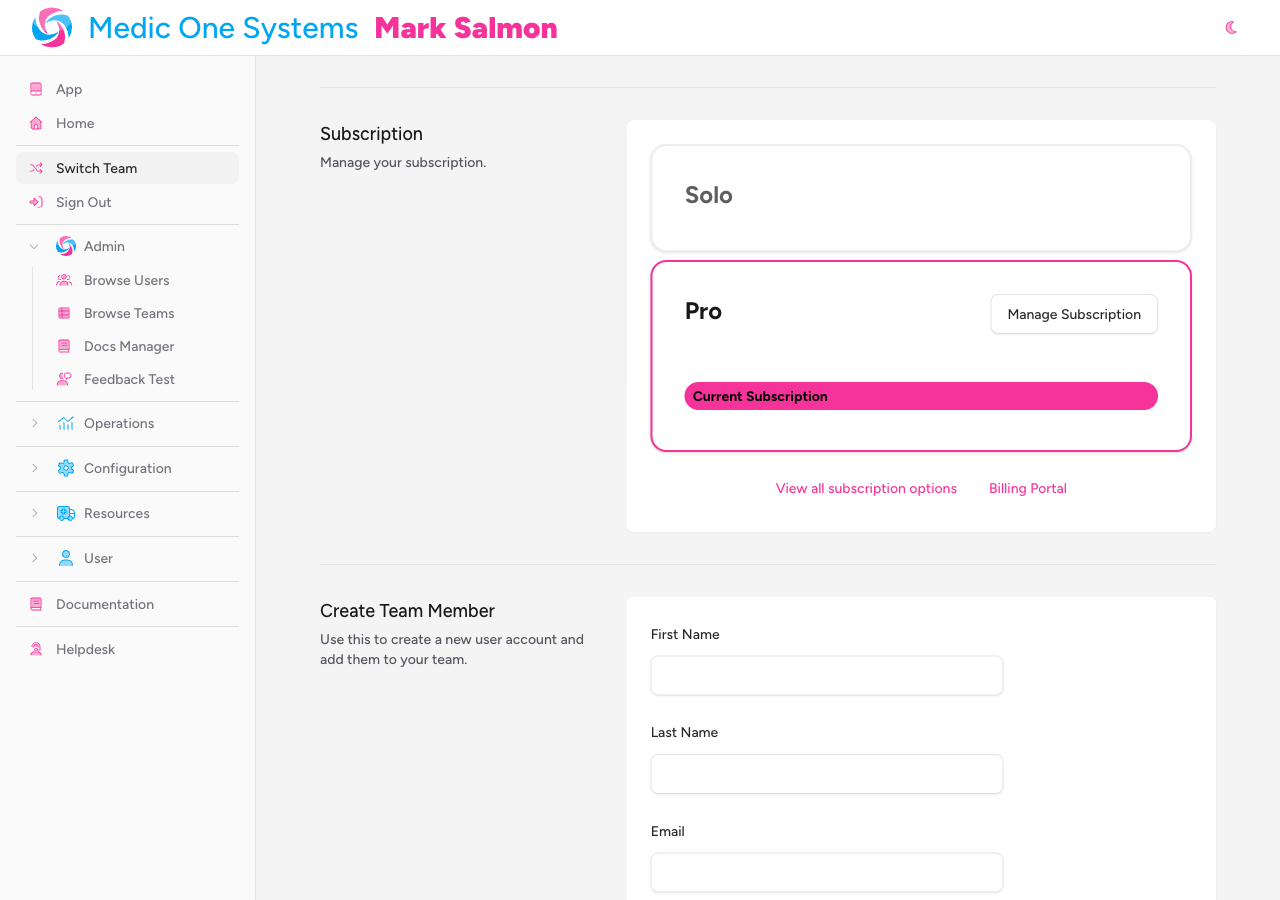
- Each available plan is shown as a card. Your current plan is highlighted.
- On the plan you want, choose your billing frequency — Monthly or Yearly — then choose a payment method:
- Pay by card — you're redirected to Stripe's secure checkout to enter your card details. The subscription activates immediately on successful payment.
- Pay by invoice — an invoice is generated and sent to your team owner's email address. The subscription activates once payment is confirmed.
- After subscribing, the page refreshes and your current plan is updated.
You can view the full pricing page at any time using the View all subscription options link at the bottom of the Subscription section, or by visiting
/pricing— it's publicly accessible without logging in.
Annual Billing
Choosing yearly billing gives you 12 months for the price of 11 — an 8.3% saving — and locks in your price for the year. Prices are ex-VAT.
IndieBase may adjust prices (for example, in line with CPI) with 60 days' notice. Any price change takes effect at your next renewal date, so annual billing also protects you from mid-year price increases.
Managing an Active Subscription
Once your team has an active subscription, the plan cards update to show your current plan with a Current Subscription badge, and a Manage Subscription button appears.
Clicking Manage Subscription (or the Billing Portal link at the bottom of the section) takes you to the Stripe Billing Portal, where you can:
- Update or change your payment method
- Download past invoices
- View your upcoming billing date and amount
- Cancel your subscription
The Billing Portal link also appears in the sidebar under Configuration when your team has an active subscription.
All subscriptions are rolling, prepaid contracts that auto-renew. Cancellations require 30 days' notice and are processed through the Billing Portal.
If a renewal payment fails
Your team's features keep working while Stripe automatically retries the charge — nothing disappears mid-shift because of a payment hiccup. While retries are in progress, the team owner sees a persistent payment problem banner (on the web and in the app) linking to the Billing Portal. If the payment can't be collected and the subscription is finally cancelled, access to paid features is suspended until billing is put right — your data is never deleted.
Changing Plans
To upgrade or downgrade, go to the Pricing page (accessible via View all subscription options in the Subscription section). The pricing page shows Switch to [Plan] buttons for other options when you're logged in.
- Upgrading — the new plan takes effect immediately.
- Downgrading to Free — use the Switch to Free button on the pricing page, which takes you to the Billing Portal to cancel your paid subscription. The Free plan takes effect at the end of your current billing period.
Switching between paid plans changes your price and allowances, not your features. Switching to Free removes access to paid features — but your data is never deleted; only access is restricted.
Tips & Best Practices
- Start with the trial before committing. The 31-day trial gives you full access — use it to work out whether your team actually needs the paid features before locking in a billing cycle.
- Annual billing saves money. If you know you'll use IndieBase long-term, annual billing works out roughly 8% cheaper than monthly and fixes your price for the year.
- PID storage requires more than a paid plan. To store Patient Identifiable Data (names, addresses, dates of birth), your team also needs an ICO Registration Number entered in Team Settings, plus acceptance of the Terms of Service.
- Only the team owner needs to manage billing. There's no need for other team members to be involved in subscription decisions — the plan applies to everyone automatically.
Troubleshooting
I'm the team owner but I can't see a Manage Subscription or Billing Portal button. The Billing Portal link appears only once your team has been registered as a Stripe customer, which happens when you first subscribe. If you're on the Free plan and have never subscribed, use the plan cards in the Subscription section to start a subscription.
I subscribed but some features are still locked. Try refreshing the page — feature access is determined by your active plan status, which updates immediately after subscribing by card. If the issue persists after a refresh, contact support with your team name and the plan you subscribed to.
My trial expired before I subscribed — can I still get a trial? Trials are only available to teams that have never previously held a subscription. Once a team has had any subscription (including a cancelled one), the 31-day trial is no longer available. Contact support if you believe this is an error.
My charity number isn't being recognised. IndieBase verifies numbers against the UK Charity Commission API. Make sure you're entering the number exactly as it appears on the Charity Commission register. If the number is correct but still not verifying, the API may be temporarily unavailable — try again later or contact support.
I want to cancel my subscription. Go to the Billing Portal via the Manage Subscription button in your Team Settings and follow the cancellation flow there. Cancellations require 30 days' notice. Your plan remains active until the end of the notice period.
- Teams (coming soon)
- Account Settings — updating your personal details, password, and two-factor authentication
- Definition of User — understanding user roles and what team members can access